Pictures, sounds, words. One sentence finds them all.
“The beach video from last year with loud splashing.” “The photo of that circuit board with the part numbers.” “The part of the meeting about quarterly revenue.” Describe it the way you remember it, and Threebrook Seek takes you straight to the photo, the exact seconds, the right page. Everything runs on your own PC. Nothing is uploaded.
Personal edition is free · 14-day Pro trial on first install · Standard installer about 1 GB (models included)
the beach video from last year with loud splashing
Beach_2025-07-19.mp4
Video · 3 min 12 s · July 2025
Picture: beach, someone in shallow waterSound: loud splashing and laughterTime: last year
00:00▶ Play from 00:4203:12
IMG_20250312_154208.jpg
Photo · March 2025
Picture: circuit boardText in photo: STM32F407, 3.3V
For part numbers and specs that must match exactly, use quotes: "STM32F407"
Weekly-sync_Oct-8.m4a
Recording · 58 min · matched to “Q3 Review.pptx” automatically
Said: “This quarter’s revenue…”Slide 5
00:00▶ Play from 12:3658:04
The real app
See what it looks like
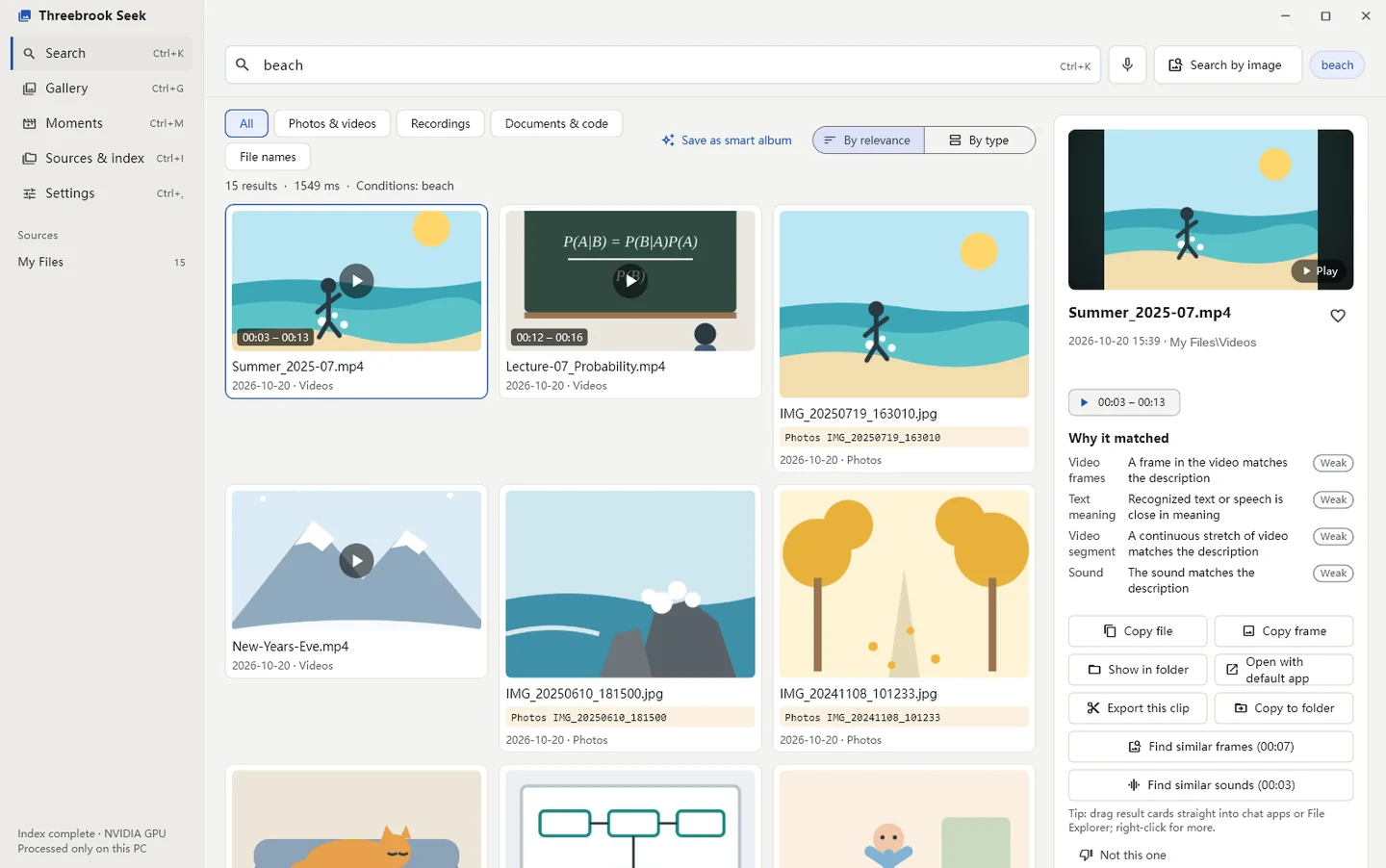
Search “beach”: photos and videos are ranked together, and videos show exactly which part matched. The panel on the right explains why, and lets you copy, drag out or find similar.
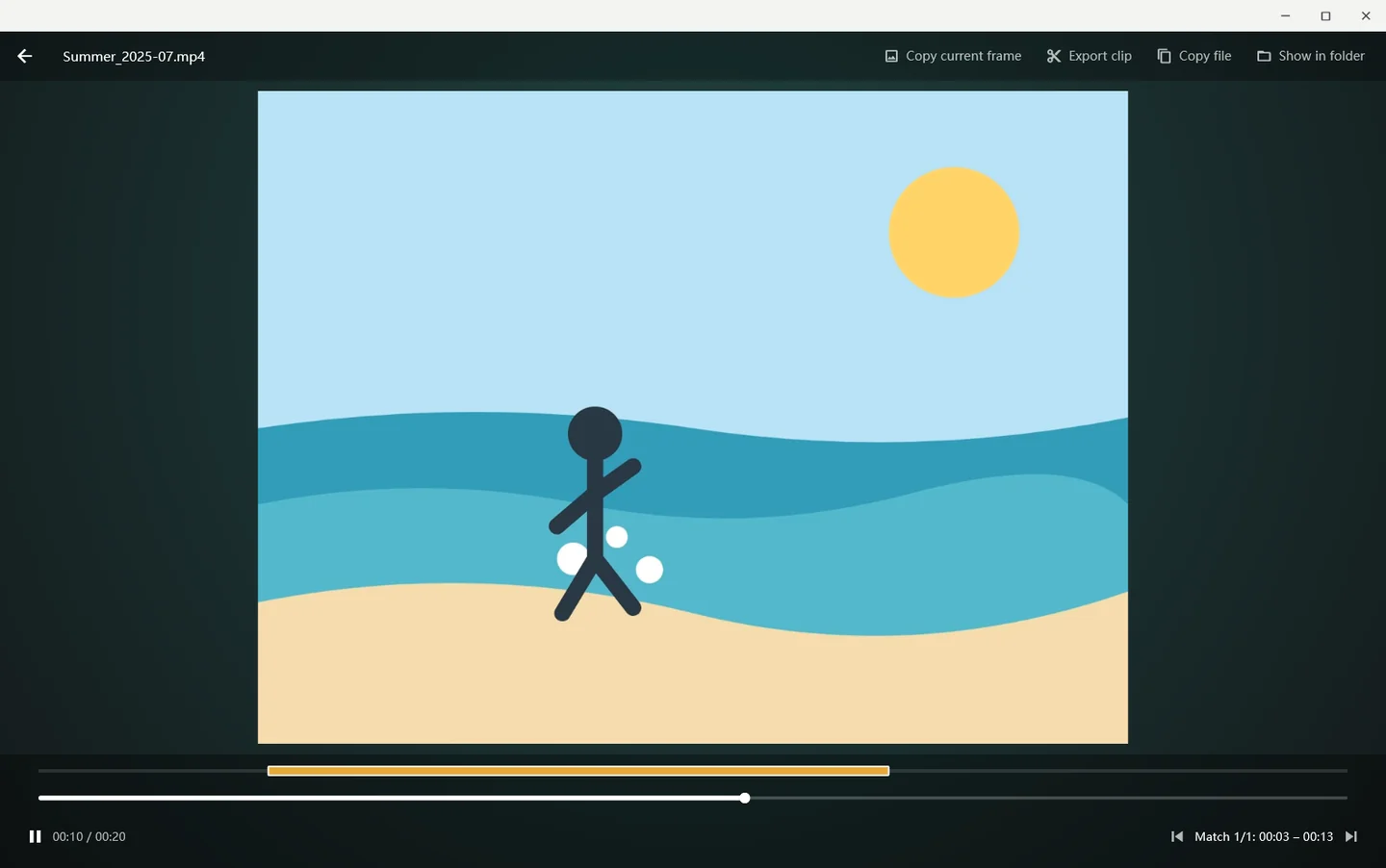
Open the video and the highlighted part of the timeline is the match. Playback starts right there, and you can export just that clip from the top-right corner.
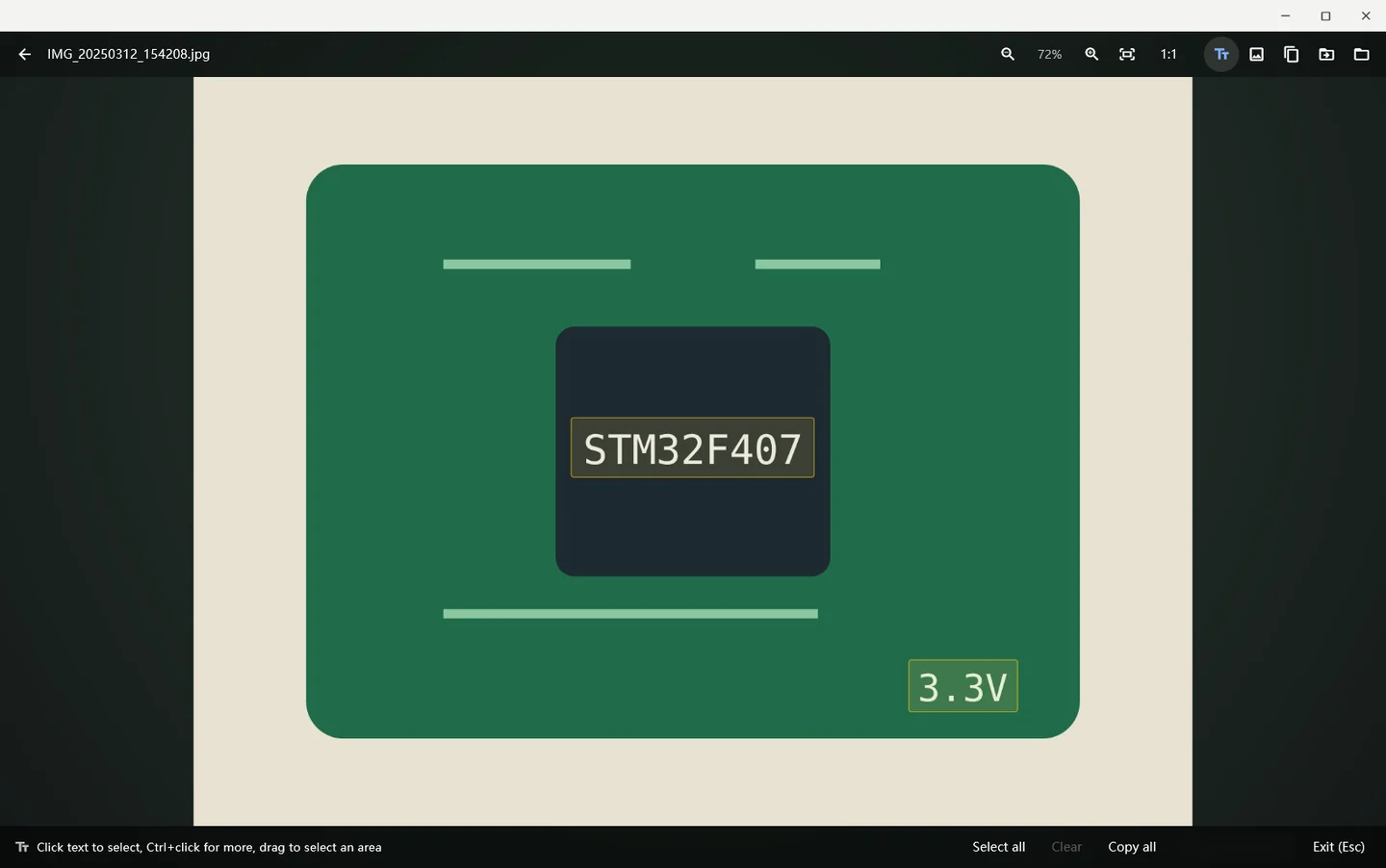
Part numbers and specs in the photo are recognized: search "STM32F407" to find it, then select the text to copy it.
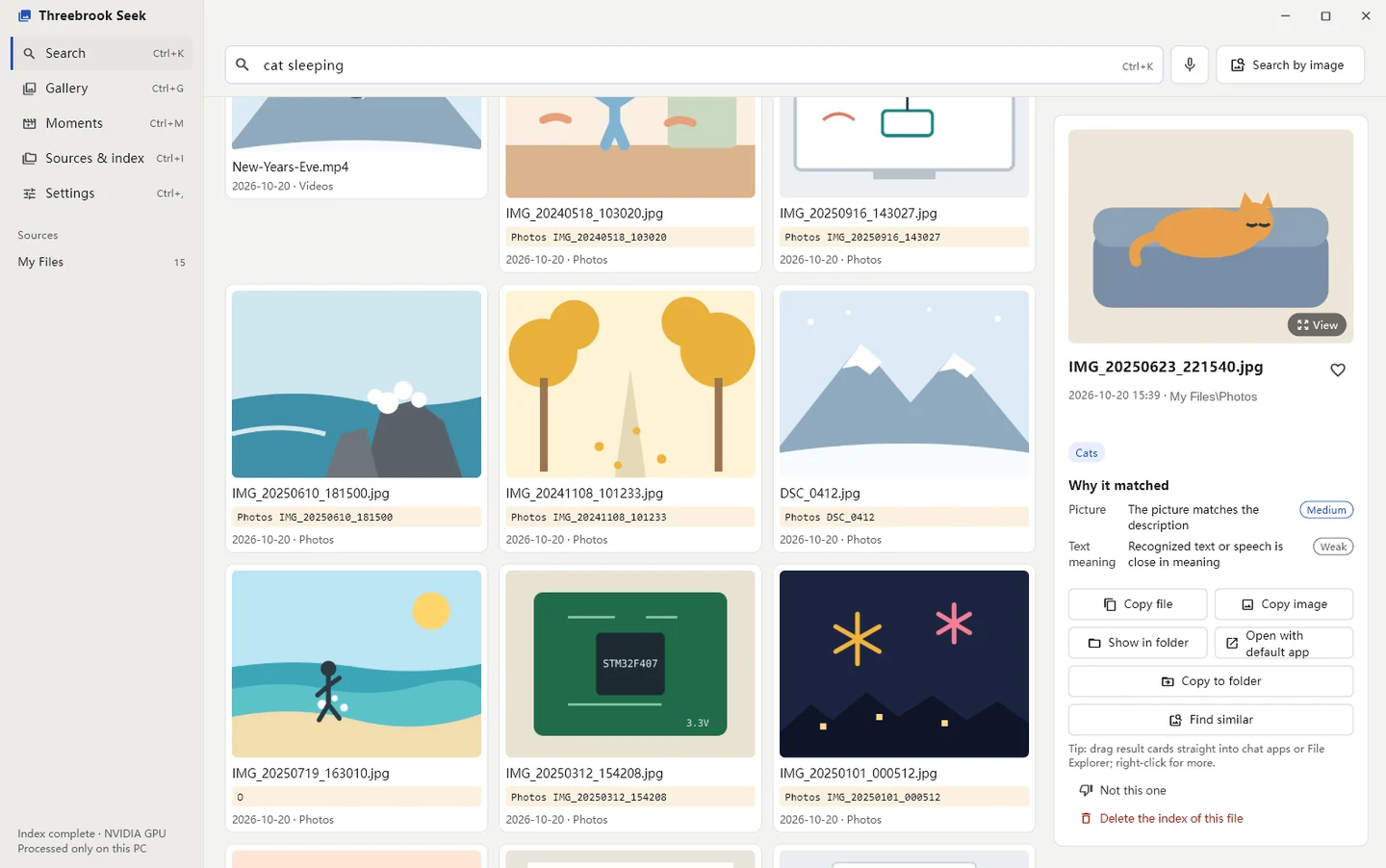
Search “cat sleeping”: besides the photo, the dozen seconds where the cat shows up in a summer video are found too.
Screenshots are from the real Threebrook Seek, in English. The photos and videos in them are illustrations we drew ourselves.
Who it’s for
Ever hunted for a file like this?
Files pile up. You remember what it looked like or what someone said, just not the folder or the file name. In moments like these, one sentence is enough.
PARENTS
Years of photos and videos of the kids
Tens of thousands of files exported from your phone, all named VID_2024… Finding “first steps” means scrolling until your eyes hurt.
“baby’s first steps”
Jumps to the exact seconds in the video · Trips and birthdays grouped into Moments
FAMILY ARCHIVISTS
Old albums scanned into the computer
Hundreds of scans named Scan_0001 to Scan_0420, with no dates and no tags. All you remember is that your grandparents stood in front of the old house.
“grandma and grandpa in front of the old house”
Search by what’s in the picture · Reads handwriting on the back · Find similar and duplicates
PEOPLE IN MEETINGS Pro
“What was that number from the last meeting?”
A two-hour recording, a forty-slide deck. Your manager asks, and you only remember it came up during the revenue part.
“the part of the meeting about quarterly revenue”
Recordings line up with each slide · Jump to where a slide was discussed · Export draft minutes
VIDEO CREATORS
Hundreds of clips, and you need one B-roll shot
Halfway through an edit you need a few seconds of “waves on rocks, no people”. The clips are named A001 to A480, so you scrub through them one by one.
“waves hitting rocks, no people”
Video search to the second · Right-click to export just that clip · Drag it into your editor
ENGINEERS & DESIGNERS
All you remember is a part number
Thousands of photos of boards, whiteboards and handwritten specs. The one you need says STM32F407 somewhere, and that’s all you recall.
“photo of a circuit board with part numbers”
Text in photos and screenshots is searchable · Quotes for exact matches · Pro also searches code
STUDENTS & RESEARCHERS
Exam week, and you can’t find where that formula was explained
A semester of lecture videos and slides, plus hundreds of PDF papers. You want the few minutes on Bayes’ theorem.
“where the professor explains Bayes’ theorem”
Search what was said in lectures and written on the board · Find PDFs and slides by content
Three brooks, one search box
Your files hold three kinds of things. It understands all of them.
Threebrook (三溪, “three brooks”) is the small town our team lives in. Threebrook Seek brings together what’s in your pictures, what’s in your audio and what’s in your text, and pours them into one search box.
Pictures
Photos, video frames, and pages of PDFs and slide decks. Find them by what you saw, with no file names to remember and no tagging first.
my kid riding a bike for the first timewhiteboard covered in flowcharts
Sounds
Audio in recordings and videos. Speech is transcribed, and it also recognizes applause, laughter, waves, fireworks and more.
everyone singing together at the partythe call where someone said “ship it next Wednesday”
Words
Word, Excel, PDF, web pages, e-books, email, code, plus the text inside screenshots and photos. It finds things that mean the same, not just the same words.
the page of the lease about late feesinvoice for $1,280
Try it
Search a tiny sample library
Below are 16 sample files: photos, videos, recordings, screenshots and documents. Pick a sentence to see what comes up and which second a video starts from.
The demo uses illustrations and pre-arranged results. This page doesn’t go online or run any model, so it only knows the sentences above. Once installed, you can search your own files in your own words.
Compare
How it compares to what you use now
A general overview; individual products vary.
Threebrook Seek
Cloud photo services
Built-in photo apps
File-name search tools
Find photos with a sentence
✓
✓
Partly
—
Jump to the seconds in a video
✓
—
—
—
Search what was said in recordings
✓
—
—
—
Text in photos and screenshots
✓
✓
Partly
—
Contents of documents, PDFs, slides
✓
—
—
Names only
No uploading your photos
✓
Upload required
✓
✓
Cost
Personal free; Pro is a one-time purchase ($29 at launch)
Storage subscription
Free
Mostly free
To the second
A two-hour video, straight to the seconds you want
Once a video or recording is found, there’s no more scrubbing. The highlighted part of the timeline is the stretch closest to what you said. Click it and playback starts there.
1
Videos are indexed in segments by picture and sound; recordings are transcribed sentence by sentence.
2
Each segment is scored when you search, and the closest ones light up on the timeline, usually to within 2–10 seconds.
3
Right-click to export just that part as a short video or audio clip to send to someone.
Match
Timeline
Time
0:00:000:43:10 – 0:43:181:58:40
Privacy
Your photos never leave your computer
The AI models that recognize pictures, transcribe audio and read documents are installed on your PC. It works the same with no internet at all.
Offline
The Personal edition contains no networking code: no uploads, no analytics, no ads. Even “check for updates” just opens our download page in your browser.
Encrypted library
The index, thumbnails and recognized text are stored encrypted, with the key protected by your Windows account.
Sensitive features off
Face grouping and place lookup are off by default and ask first. Turn them off and the related data is deleted too.
Originals untouched
It only reads the folders you choose and never moves or changes your files. When uninstalling, you decide whether to delete the index.
Safe for lawyers, doctors, accountants and anyone whose files can’t go to the cloud. This website has no analytics or third-party trackers either: we don’t know who you are, and we don’t need to.
After you find it
It can also help with
Quick search bar
Call it up with a shortcut from any app, then drag results straight into chat, Word or File Explorer.
Moments
Photos and videos from trips, parties and holidays are grouped into Moments, with the seconds of applause, laughter or fireworks picked out.
Recordings meet slidesPro
Recordings find their matching deck and line up slide by slide. Export draft minutes with the transcript under each slide.
Search by image, paste to search
Take a screenshot and press Ctrl+V in the search box to find similar photos. Pick a sound clip to find ones that sound alike.
Smart collections
Save a search as a collection, and new photos that fit it join on their own.
Private folders
Mark a folder private and it only appears in search and the gallery after Windows Hello.
Tuanzi
A little dumpling on your desktop that finds things for you
Tuanzi (团子, “little dumpling”) eats the folders you drag to it: cheeks puffing while it indexes, eyes following the files as they fly in. Double-click it to search. The longer you use it, the more looks it grows, and now and then it digs up an old photo you’d forgotten. Don’t want it? Turn it off in Settings.
Editions
Personal is free, and plenty for everyday use
Your first install includes a 14-day Pro trial. When it ends you’re on Personal, and everything already indexed stays. Pro is a one-time purchase, not a subscription, with a year of free updates.
Personal
Free
One-sentence search across photos, videos, recordings and documents
Video search to the second, search by image, paste a screenshot to search